Understanding Caching in Next.js (ISR, SSR, Static, Edge)
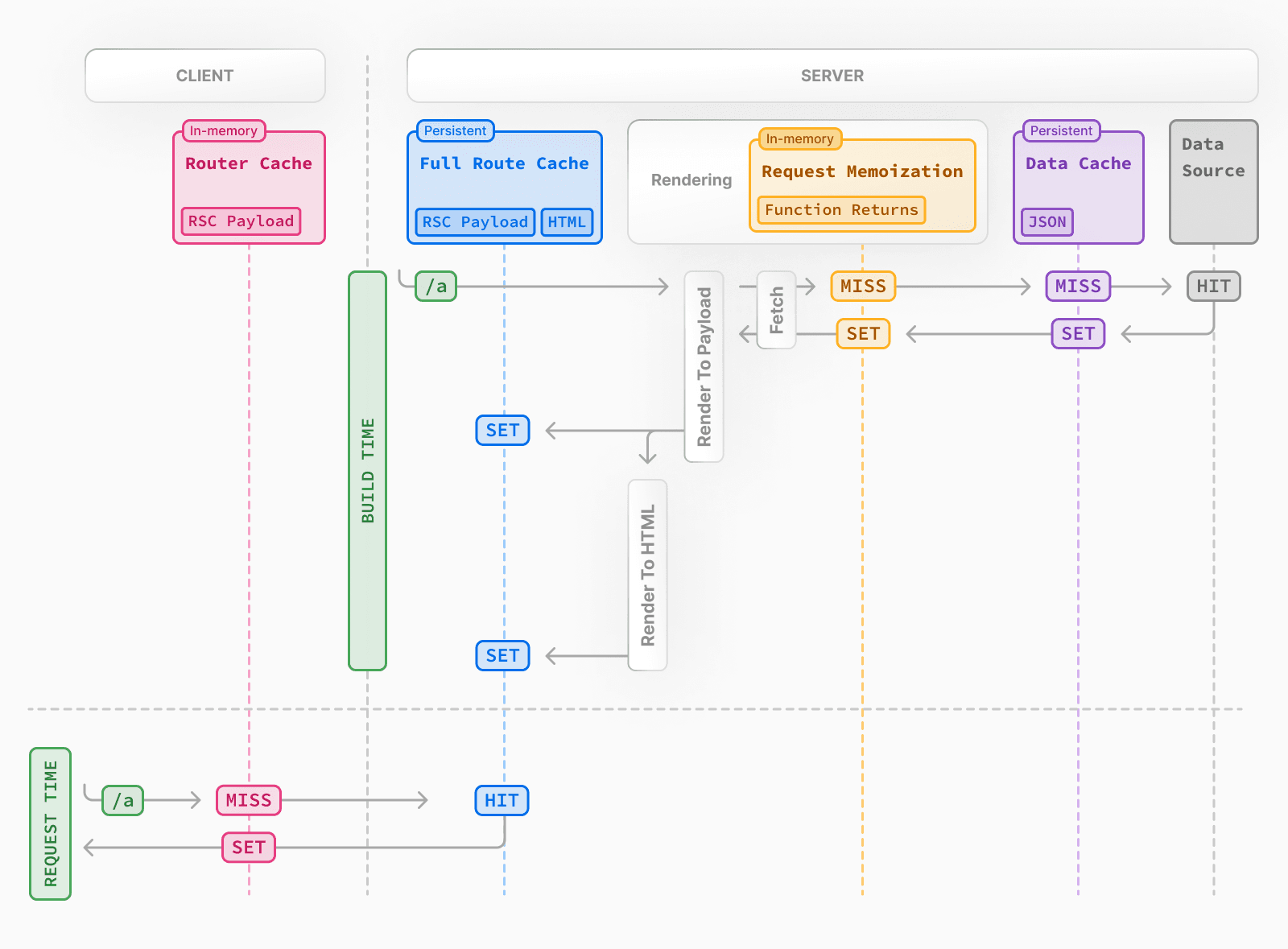
Caching in Next.js is one of those things that sounds simple…
Until you actually try to understand what’s happening.
At some point, every developer reaches this moment:
“Why is my data not updating?”
“Why is this page cached?”
“Why is this NOT cached?”
And suddenly you’re deep in docs, random GitHub issues, and still not 100% sure what’s going on.
I’ve been there. More than once.
So let’s break this down properly—ISR, SSR, Static, and Edge—not just theoretically, but from real-world pain.
🧩 Why Caching in Next.js Feels Confusing
Because it’s not just “caching.”
It’s:
Page-level caching
Fetch-level caching
Build-time vs request-time
Server vs Edge
Revalidation rules
And the worst part?
👉 Sometimes caching happens without you explicitly asking for it
⚡ Static Rendering (SSG): The “Set It and Forget It” Trap
What it is
Static Site Generation means:
Your page is generated at build time
Example
// app/blog/page.tsx
export default async function Page() {
  const res = await fetch("https://api.example.com/posts");
  const posts = await res.json();

  return <div>{posts.length} posts</div>;
}
In Next.js App Router:
👉 This is static by default
😤 The frustration
You deploy your app.
Then:
You update your database
Refresh the page
And…
NOTHING changes.
Because guess what?
👉 It was cached at build time.
🧠 Realization
Static rendering is great when:
Content rarely changes
You want maximum performance
But if your data changes frequently?
👉 This will silently betray you.
🔄 ISR (Incremental Static Regeneration): The “Wait… Did It Update?” Mode
What it is
ISR allows you to:
Regenerate static pages after a certain time
Example
// app/blog/page.tsx
export const revalidate = 60; // seconds

export default async function Page() {
  const res = await fetch("https://api.example.com/posts");
  const posts = await res.json();

  return <div>{posts.length} posts</div>;
}
What actually happens
First request → cached page served
After 60 seconds → next request triggers regeneration
New content appears… eventually
😤 The frustration
This part is always confusing:
“Why didn’t my update show immediately?”
Because ISR is:
👉 stale-while-revalidate
Meaning:
Users still see old data
New data comes later
🧠 Real-world take
ISR is good when:
Data updates occasionally
You don’t need real-time accuracy
But if you're building dashboards or live systems?
👉 ISR will make you doubt reality.
🔥 SSR (Server-Side Rendering): The “At Least It Works” Option
What it is
SSR means:
Data is fetched on every request
Example
// app/dashboard/page.tsx
export const dynamic = "force-dynamic";

export default async function Page() {
  const res = await fetch("https://api.example.com/data", {
    cache: "no-store",
  });

  const data = await res.json();

  return <div>{data.value}</div>;
}
Why developers fall back to this
Because after fighting caching:
“I just want fresh data. Always.”
😤 The downside
Slower performance
More server load
No caching benefits
🧠 Real-world take
SSR is like:
“Fine. I’ll do everything manually.”
Reliable—but not efficient.
🌍 Edge Runtime: The “Sounds Cool, But…” Layer
What it is
Edge runs your code closer to the user using global servers.
Example
export const runtime = "edge";

export default async function Page() {
  const res = await fetch("https://api.example.com/data");
  const data = await res.json();

  return <div>{data.value}</div>;
}
Why it’s attractive
Faster response globally
Lower latency
Modern architecture
😤 The hidden pain
Limited Node.js APIs
Debugging is harder
Caching behavior can feel different
Sometimes you’re just sitting there thinking:
“Is this a caching issue… or an edge issue?”
🧠 Real-world take
Edge is powerful—but adds another layer of complexity.
🧠 The Real Problem: Fetch Caching (The Silent Culprit)
This is where most confusion comes from.
In Next.js:
await fetch("https://api.example.com/data");By default:
👉 This can be cached
Controlling it
Force no cache
fetch(url, { cache: "no-store" });Set revalidation
fetch(url, { next: { revalidate: 60 } });😤 Why this is frustrating
Because now you have:
Page-level caching
Fetch-level caching
And they can conflict.
🧠 Realization
If you don’t understand fetch caching, you don’t understand Next.js caching.
⚖️ When to Use What (Based on Reality)
Use Static (SSG) if:
Blog posts
Marketing pages
Docs
👉 Performance > freshness
Use ISR if:
Content updates occasionally
You can tolerate stale data
👉 Balance of speed + freshness
Use SSR if:
Dashboards
User-specific data
Real-time systems
👉 Freshness > performance
Use Edge if:
Global users
Latency matters
You understand its limitations
👉 Advanced optimization
😤 The Truth Nobody Tells You
Here’s what I wish someone told me earlier:
Next.js caching is not one system.
It’s multiple systems stacked together.
And when something breaks:
👉 You don’t know which layer is responsible.
🧠 My Personal Strategy (After All the Pain)
Now I keep it simple:
Default to SSR (
no-store) when building featuresAdd caching intentionally later
Avoid “accidental caching”
Because honestly:
Debugging caching issues wastes more time than optimizing performance early.
🧠 Final Thought
Caching in Next.js is powerful.
But power without clarity becomes frustration.
You don’t just need to know:
ISR
SSR
Static
Edge
You need to understand:
👉 When NOT to use them